Mobile
version
Articles
& news
Site
map
Feed
back
Add to
bookmark
English
Русский
Aprilia
BMW
Ducati
Harley
Honda
Kawasaki
Suzuki
Triumph
Yamaha
Aprilia:
RS-series▾
RS125 [3]
(1999-2005)
Shiver▾
SL750
(2007-2016)
Installing the crankshaft
(Aprilia Shiver SL 750)
Main
Aprilia
Shiver
SL 750
Engine and systems
Engine repair
0
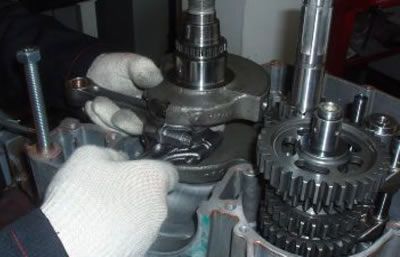
Place the left side crankcase half on the engine support adequately.
Place the crankshaft on the seat of the crankcase half with caution.
See also
specifications
for this operation.
See this article in
russian
language
◀ Previous
Aprilia SL750 : Engine repair
Next ▶
Crankcase — removal and installation
Inspecting the crankshaft components
Inspecting the crankcase halves
Removing the crankshaft
Splitting the crankcase halves
Installing the head cover
Installing the cylinder head
Selecting the base gasket
Installing the cylinder
Fitting the piston
Refitting the crankcase halves
Similar articles about motorcycles of other brands
BMW R-series R 1150 GS 1999-2004:
Installing crankshaft
Yamaha Fazer FZ1 2006-2015:
Installing the crankshaft position
Suzuki DR-Z DRZ-250 1996-2007:
Runout of crankshaft journals
Triumph Rocket III 2004-2018:
Exploded view — crankshaft, connecting rod and piston
Honda VTX series VTX 1800 C 2001-2008:
Removing and installing the seat
Ducati ST series ST2 1997-2003:
Overhaul crankshaft
Harley V-Rod VRSCA 2002-2006:
Crankshaft bearing replacement
Kawasaki ZX-6R ZX600-J1/J2 2000-2002:
Crankshaft and transmission exploded view
Link to this article in different formats
TEXT
HTML
BB Code
Article about repair motorcycles «Aprilia Shiver SL 750» (2007-2016): «Installing the crankshaft»: https://motoinstruction.ru/en/Aprilia/Shiver/SL750/engine/repair/114621
<a href="https://motoinstruction.ru/en/Aprilia/Shiver/SL750/engine/repair/114621">Installing the crankshaft</a> - article about repair motorcycles «Aprilia Shiver SL 750» (2007-2016) from section «Engine repair».
[url=https://motoinstruction.ru/en/Aprilia/Shiver/SL750/engine/repair/114621]Installing the crankshaft[/url] - article about repair motorcycles «Aprilia Shiver SL 750» (2007-2016) from section «Engine repair».
Comments and feedback from visitors
No comments yet, you will be the first!
Add up two numbers: 35 + 32
SL750
(2007-2016)
Information for owner
Introduction to manual
Control devices
Operation manual
Technical characteristics
Maintenance
Engine and systems
Engine repair
Lubrication system
Cooling system
Fuel system
Transmission
Running gear and frame
Frame and hinged elements
Front suspension and handlebar
Rear suspension
Brake system
Electric equipment
Equipment and devices
Aprilia
:
RS-series
Shiver
(map)
BMW
:
F-series
R-series
K-series
(map)
Ducati
:
ST series
Monster
(map)
Harley
:
Street
Sportster
V-Rod
(map)
Honda
:
Africa Twin
CB series
VTX series
(map)
Kawasaki
:
ZX-6R
Versys
Vulcan
(map)
Suzuki
:
DR-Z
V-Strom
Boulevard
(map)
Triumph
:
Rocket
Street Triple
(map)
Yamaha
:
Fazer
DragStar
R1
(map)
MotoInstruction.ru
© 2021–2024
|
Sitemap
|
Articles
|
Contacts
|
Site search
|
Add to bookmarks
|
Mobile version